
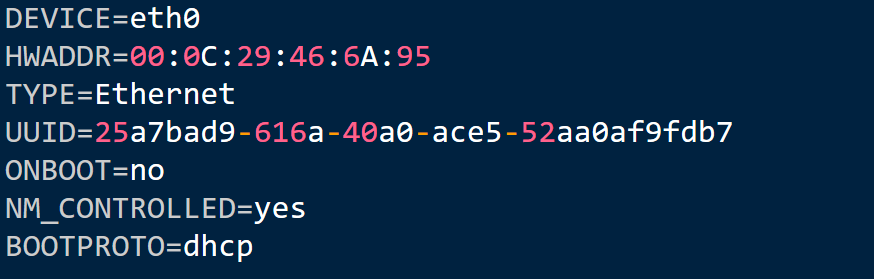
The first step after finishing installation of CentOS, you will require to configure the IP address. The use of CentOS is common as a server. You will need to provide static IP address to it. CentOS is configured to receive IP from DHCP server by default.
Steps to Configure Static IP Address in CentOS:-
1.Under /etc/sysconfig/network-scripts , you will find all the files required for network configuration. We are using nano editor. And now the next step after starting the server that is running CentOS is to enter root user credentials to log in. Enter this command
# nano /etc/sysconfig/network-scripts/ifcfg-eth0
2. Default configuration will appear like this,

3. Now change the default configuration same as given in pic.
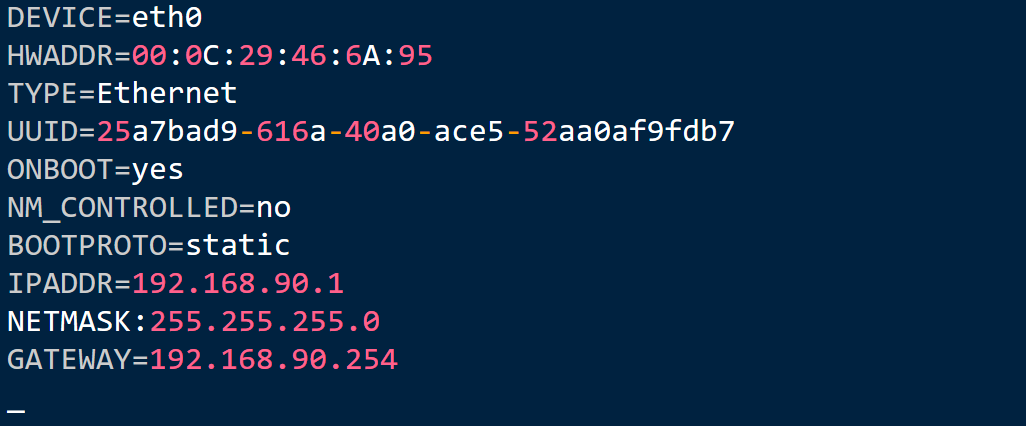
4. Press ctrl+x to save the file and exit. You will be asked for confirmation, type y.
5. Restart network service through this command
[root@hostname~]# service network restart
6. Verify the IP address
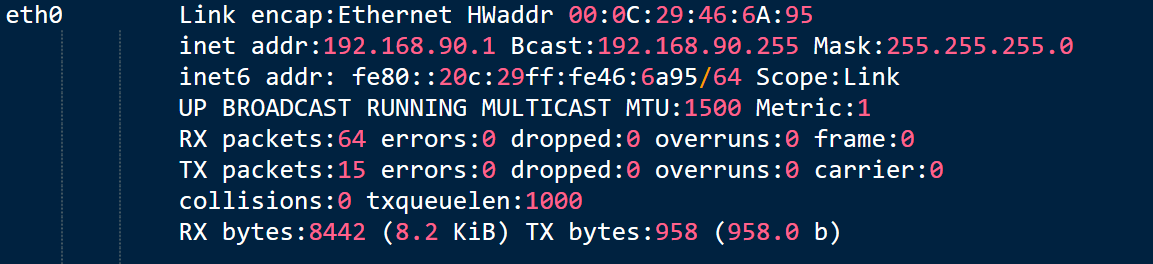
[root@hostname~]# ifconfig
Following information will appear on screen.
7. Next step after configuring IP address is DNS configuration. DNS information or Name server is located in different file location that is, /etc/recolv.conf. Now for the configuration of DNS information nano editor will be used.
[root@hostname~]# nano /etc/resolv.conf
You will need to enter at least one entry as by default this file will be empty.
nameserver 4.2.2.2
Depending upon network scenario, name server IP address can vary. We will use www.google.com. After that save the file and exit. If you want to test the configuration, use the ping command.
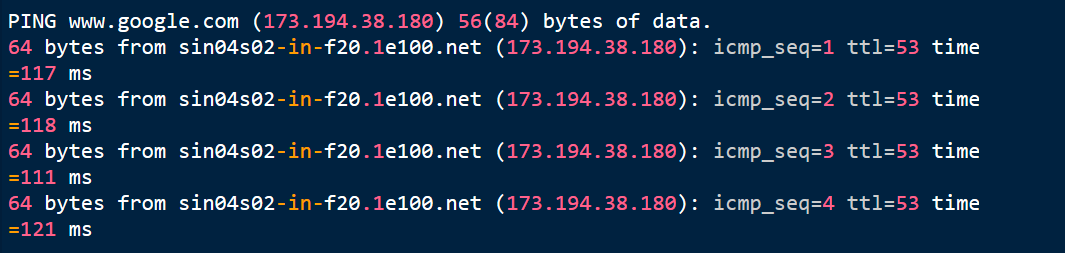
[root@hostname~]# ping www.google.com
When you get the reply as shown in this given picture then that means you have successfully configured the DNS information and IP address.

"Understanding CentOS IP configuration empowers administrators to create predictable, scalable, and well managed server networks."
Kwik Server
Why is Kwik Server the top choice for hosting?
- Instant VPS provisioning through modules
- Option to restart or reinstall OS in a single click
- VPS and Dedicated servers have port 25 open by default
- Round the clock customer support through Live Chat and SkyPe
- Distinguished provider of affordable AMD, Ampere and Intel Servers
- Storage Servers at unbelievable low cost and expandable upto 96TB
- Top ranked Encoding RDP provider with unmatched powerful servers in the industry