
The best free control panel for a VPS depends on what you host. HestiaCP is the easiest cPanel-style panel, CyberPanel suits WordPress on OpenLiteSpeed, Virtualmin covers websites and mail on almost any distro, Webmin manages the server itself, and ISPConfig 3 is for technical users. On a KwikServer Linux VPS, any of the five installs for free.
This guide is for anyone moving off shared hosting, or tired of paying for cPanel licences, who wants a web interface for sites, databases and email on their own server. You’ll see which panel runs on which OS, how much RAM each one needs, how long installs took on our own servers, and how to get one running without touching the command line.
Which free control panel should you use on a VPS?
If you want a short answer: pick HestiaCP for a simple website and email server on Ubuntu or Debian, CyberPanel for WordPress speed, and Virtualmin if you need AlmaLinux or Rocky Linux. The table below has the details we check before installing each one.
| Panel | Best for | Supported OS | Min. RAM | Login port | Our install time |
|---|---|---|---|---|---|
| HestiaCP | Simple web, mail and DNS hosting with a cPanel-like layout | Ubuntu 22.04/24.04, Debian 12/13 | 1 GB | 8083 | About 20 min |
| CyberPanel | WordPress on OpenLiteSpeed | Ubuntu 22.04/24.04, AlmaLinux 8/9/10, Rocky Linux 8/9 | 1 GB | 8090 | 34 to 42 min |
| Virtualmin | Full hosting (domains, mail, DNS, databases) on any major distro | Ubuntu 24.04, Debian 12/13, AlmaLinux 8/9/10, Rocky Linux 8/9/10 | 1 GB | 10000 | About 34 min |
| Webmin | Managing the server itself: users, services, packages, files | Ubuntu 22.04/24.04, Debian 12/13, AlmaLinux 8/9/10, Rocky Linux 8/9/10 | 512 MB | 10000 | About 11 min |
| ISPConfig 3 | Technical users who want fine control of web, mail and DNS | Ubuntu 22.04/24.04, Debian 12/13 | 2 GB | 8080 | About 51 min |
The install times are from our own test runs in November 2026, with the panel’s official installer, on fresh KwikServer KVM servers. Your time will vary with the plan and how much the installer has to download that day.
HestiaCP: the easiest cPanel alternative
HestiaCP is the closest free panel to the cPanel experience. You get websites, email accounts, DNS zones, databases and Let’s Encrypt certificates in one clean interface, and it stays light on resources.
It’s the maintained successor to VestaCP, which is why we install HestiaCP instead of VestaCP. The catch is OS support: it only runs on Ubuntu and Debian, so if you need AlmaLinux, look at Virtualmin or CyberPanel instead. On our test server, a HestiaCP install finished in about 20 minutes, including the automatic reboot at the end. The full requirements are in the HestiaCP getting started docs.
CyberPanel: built for WordPress speed
CyberPanel is built around the OpenLiteSpeed web server, and most people pick it for WordPress. If your sites are mostly WordPress and page speed is what you care about, this is the one to try.
It is heavier than HestiaCP and takes longer to install: 34 minutes on Ubuntu 24.04 and 42 minutes on AlmaLinux 9 in our tests. It doesn’t support Debian. If you plan to run several busy WordPress sites with it, we’d pick the Essential plan or above rather than the 3 GB Basic plan. See the CyberPanel project page for its own requirements.
Webmin vs Virtualmin: what’s the difference?
Webmin manages the server; Virtualmin manages websites on that server. Virtualmin is built on top of Webmin, so installing Virtualmin gives you both.
Choose Webmin if you just want a browser view of users, services, packages and files, and you’ll run your apps yourself. It is the lightest option (512 MB RAM) and the quickest install, about 11 minutes on our AlmaLinux 9 test.
Choose Virtualmin if you want to host websites for yourself or clients: domains, mail, DNS and databases, across Ubuntu, Debian, AlmaLinux and Rocky Linux. Our AlmaLinux 9 install took about 34 minutes. One detail worth knowing: on servers with less than 4 GB of RAM we use Virtualmin’s smaller “mini” install, which leaves out the mail, spam and virus scanning stack. If you want full mail on Virtualmin, choose the Essential plan (4 GB) or higher. Both panels log in with your server’s root account. Supported systems are listed in the Virtualmin OS support page.
ISPConfig 3: for technical users
ISPConfig 3 gives you detailed control over web, mail and DNS services. It expects you to know what a mail server and a DNS zone are.
It needs at least 2 GB of RAM and runs on Ubuntu 22.04/24.04 or Debian 12/13. It was also the slowest install in our tests, about 51 minutes on Debian 12, because it sets up a complete mail and web stack. The installer generates the admin password itself, and you’ll find it at the end of the install log.
How to install a free control panel on a KwikServer VPS
You can add a panel in three ways, and none of them need SSH. Every new KwikServer Linux VPS runs on KVM virtualization, which these panels need.
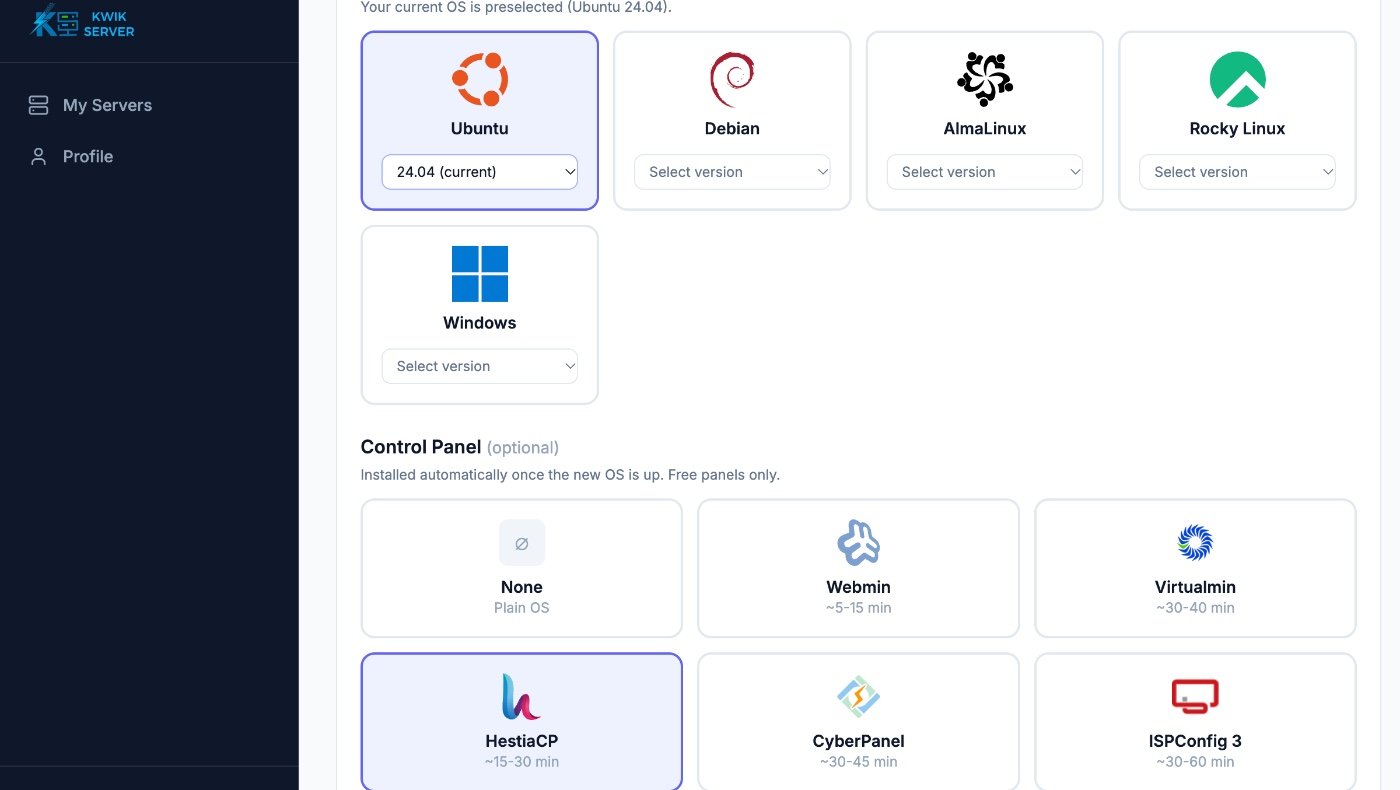
- At checkout. When you order a Linux VPS, choose a panel in the “Control Panel” option. It installs automatically once the OS is up.
- From the Control Panel tab. In the Zenith panel, open your VPS, go to Control Panel and pick one. It works best on a freshly installed OS.
- During an OS reinstall. The Reinstall screen lets you pick the operating system and a panel together. Reinstalls are unlimited, so you can try HestiaCP this week and switch to Virtualmin next week if it doesn’t fit.
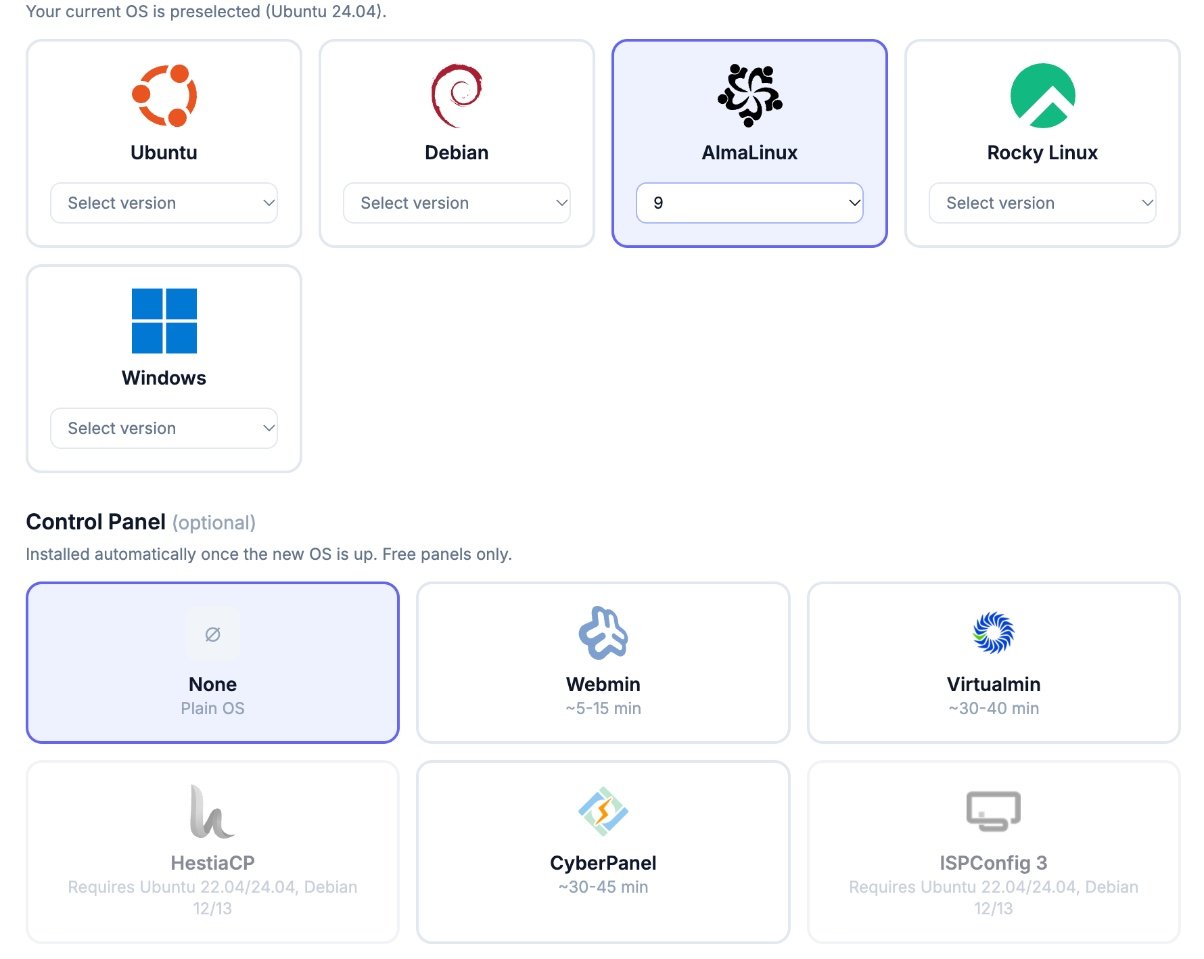
The picker greys out any panel that won’t work on your setup and tells you why, for example “Requires Ubuntu 22.04/24.04, Debian 12/13” for HestiaCP on an AlmaLinux server.
While the install runs you can follow the installer log live. When it finishes, the Control Panel tab shows the login URL, username and password with copy buttons. For Webmin and Virtualmin you log in with your root password.
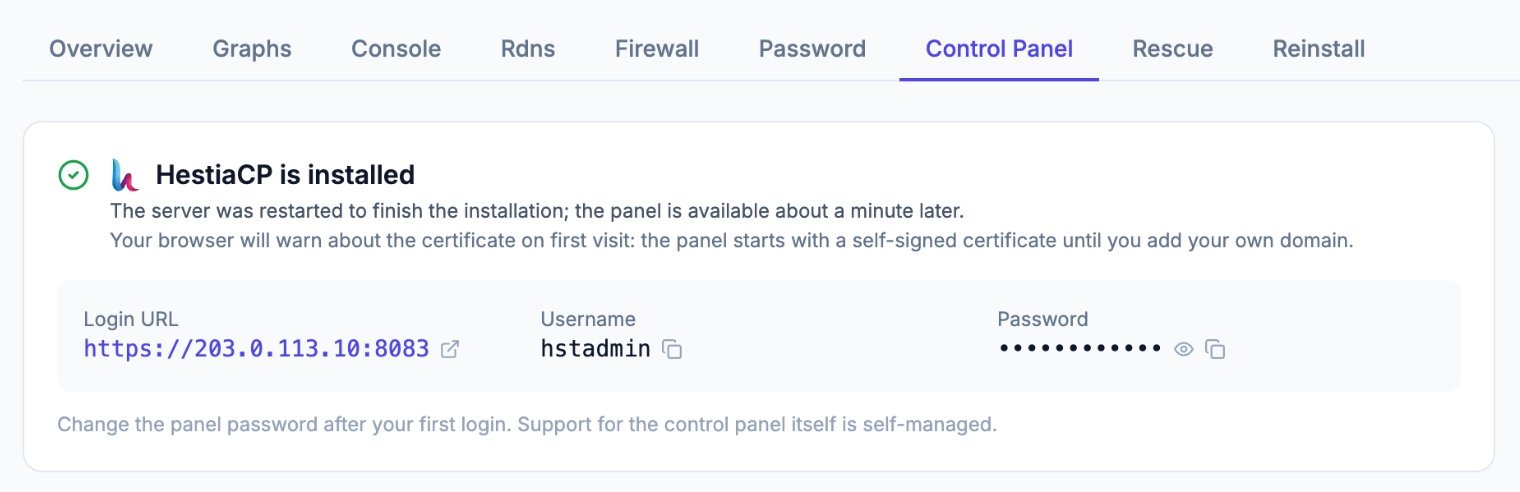
A few things we built in so installs don’t go wrong. Zenith refuses to install a second panel on a server that already has one, including cPanel, Plesk, DirectAdmin or VestaCP. For HestiaCP and CyberPanel, the installer runs with a throwaway password, and your real password is set only after the install finishes, so it never sits in the process list for half an hour. Your browser will warn about the certificate on the first visit, because the panel starts with a self-signed certificate until you add your own domain.
Want to try one? Linux VPS plans start at $19/month with 3 GB RAM, unmetered bandwidth on a 1 Gbps port, and locations in the USA, Canada, Germany and the Netherlands. Pick your panel at checkout and it’s set up for you.
What about cPanel and Plesk?
cPanel and Plesk are coming soon to the same installer. They need paid licences, so they’ll be offered as paid options, while the five panels above stay free.
If you need cPanel today because your clients already know it, HestiaCP is the closest free match for day-to-day work: it has the same kind of site, mail and DNS screens. If you’re leaving cPanel because of licence costs, it’s worth comparing the two on a test VPS. Our 7-day money-back guarantee covers new Linux VPS orders.
Who should not install a panel
Skip the panel if you deploy with Docker or run a single app like n8n or SerpBear. A panel adds a web server, mail and DNS services you won’t use, and it can conflict with your own Nginx or Docker setup. Our guides to self-hosting n8n with Docker and running SEO tools on a VPS cover that route.
Also know that the VPS is unmanaged. We look after the hardware, network, OS installs and the panel install itself. Day-to-day support for the panel (configuring sites, mail filters, plugin issues) is self-managed, and each project has its own docs and forums.
Frequently asked questions
Is the control panel really free on KwikServer?
Yes. HestiaCP, CyberPanel, Webmin, Virtualmin and ISPConfig 3 are free, open-source panels, and we install them at no extra cost on any KwikServer Linux VPS. You only pay for the VPS plan.
Which free control panel is best for WordPress?
CyberPanel, because it runs on OpenLiteSpeed, which is popular for WordPress hosting. HestiaCP is a good lighter choice if you host a few small WordPress sites and want a simpler interface.
Can I install a control panel on Windows VPS?
No. These panels are Linux-only. They’re available on our Linux VPS plans running Ubuntu, Debian, AlmaLinux or Rocky Linux.
Can I switch to a different panel later?
Yes, by reinstalling the OS and choosing a different panel on the Reinstall screen. Reinstalling erases the server, so back up your sites first. Installing a second panel on top of the first is blocked because two panels on one server fight over the same services.
How much RAM do I need for a control panel?
Webmin needs 512 MB, HestiaCP, CyberPanel and Virtualmin need 1 GB, and ISPConfig 3 needs 2 GB. All KwikServer Linux plans start at 3 GB, so every panel fits. For Virtualmin with full mail and spam filtering, choose a plan with 4 GB or more.
Why is a panel greyed out in my VPS?
Your OS isn’t on that panel’s supported list, and the picker shows which versions it needs. Some servers installed from an older AlmaLinux or Rocky Linux image also block automatic installs. Reinstalling the OS gets the updated image, or you can contact support.
Get your VPS with a free control panel
For most people, HestiaCP on Ubuntu 24.04 is the easiest start, CyberPanel is the WordPress pick, and Virtualmin is the choice if you need AlmaLinux or Rocky Linux. If you’re unsure which OS to start with, read our guide to the best OS for VPS hosting, and see what else the Zenith panel does. When you’re ready, order a Linux VPS and pick your panel at checkout.