KwikServer One-Click Apps install a ready-to-use app on your Linux VPS: n8n, Coolify, Uptime Kuma, Docker with Portainer, Open WebUI or a WireGuard VPN. Pick one when you order or from the Apps tab in the Zenith panel. The app comes up on HTTPS with an admin account already created, at no extra charge.
This guide is for people who want the app, not the setup work: freelancers automating workflows, developers who want their own deploy platform, and small teams that need monitoring or a private VPN. It covers what each app does, how much server it needs, what happens during the install, and when you are better off setting things up by hand.
What are One-Click Apps on a KwikServer VPS?
One-Click Apps are self-hosted applications that the Zenith panel installs on your KVM VPS for you. Zenith installs Docker, starts the app with its official image, puts it behind HTTPS and creates the admin login. You get the URL, username and password in the panel when it finishes.
The app runs on your own server. Nobody else shares it, the data stays on your disk, and you keep full root access to change anything later.
Which apps can you install with one click?
There are six apps today. All of them run on Ubuntu 22.04, Ubuntu 24.04, Debian 12 or Debian 13.
| App | What you use it for | Minimum server | Typical install time |
|---|---|---|---|
| n8n | Workflow automation and AI agents, with PostgreSQL included | 2 GB RAM (Essential recommended) | 3 to 6 minutes |
| Coolify | Your own Heroku or Vercel style platform: deploy apps and databases from Git | 2 vCPU and 2 GB RAM (Comfort recommended) | 6 to 10 minutes |
| Open WebUI | A ChatGPT-style chat for your team, using your own OpenAI, Anthropic or OpenRouter key | 1 GB RAM | 3 to 6 minutes |
| Docker + Portainer | Run any Docker container and manage it from the browser | 1 GB RAM | 2 to 4 minutes |
| Uptime Kuma | Uptime monitoring with status pages and alerts | 512 MB RAM | 2 to 4 minutes |
| WireGuard VPN (wg-easy) | A private VPN with a web UI: add a device, scan the QR code | 512 MB RAM | 1 to 3 minutes |
Install times are from our own test runs. On a brand-new server the operating system runs its first update before the app starts installing, so the very first install can take several minutes longer.
How do you install an app?
You can choose an app in three places, and the result is the same.
- When you order. Linux VPS plans have a “One-Click App” option on the order form. Zenith builds the server and installs the app straight after.
- From the Apps tab. On a running server, open the Apps tab, pick an app, confirm, and watch the live install log.
- During an OS reinstall. The reinstall screen lets you pick apps for the fresh system.
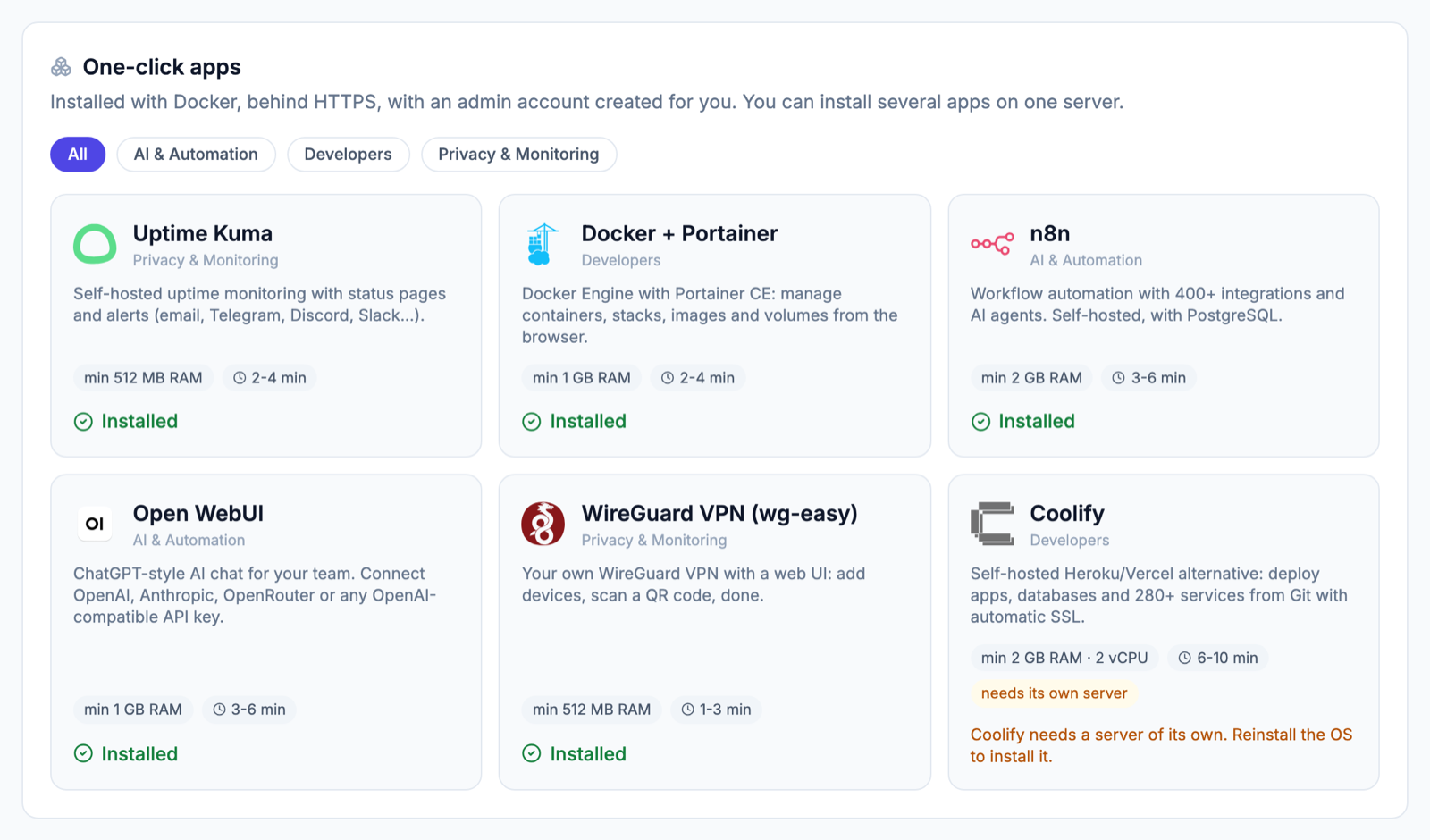
When it finishes, the Apps tab shows the app’s URL, login and password with copy buttons.
You can run several apps on one server. n8n, Uptime Kuma and WireGuard side by side on an Essential plan works fine, for example. Coolify is the exception: it manages its own proxy on ports 80 and 443, so it needs a server of its own.
Want n8n running today? Order an Essential VPS with n8n preselected and it installs as soon as the server is built.
Is a one-click app secure on a public IP?
Yes, and this is where it differs from installing an app by hand. Many self-hosted apps hand the admin account to whoever opens the page first. Fresh n8n, Portainer, Uptime Kuma and Coolify installs all work that way. On a public IP, a stranger can get there before you.
Zenith closes that gap. It creates the admin account with a random password before the app is reachable from the internet, then checks that the login works and that the first-run setup is closed. If either check fails, the app is not published at all. The app itself only listens on the server’s local interface; the internet reaches it through the HTTPS proxy.
Two things stay your job. Change the password after your first login, and keep the app updated. Running the app and its data is self-managed, the same as anything else you install on a VPS.
Can you use your own domain?
Yes. Each app starts at https://your-server-ip:port, for example port 5678 for n8n. Your browser shows a certificate warning on that first visit because the certificate is self-signed.
To get a trusted certificate, create a DNS A record for a name like automation.example.com that points to your server’s IP, then enter the name in the app’s “Attach domain” box. Zenith checks the DNS record, requests a free Let’s Encrypt certificate and switches the app to the new address. In our tests the certificate was live in about a minute. The IP address keeps working as a fallback, and for n8n the webhook URLs switch to the new domain too.
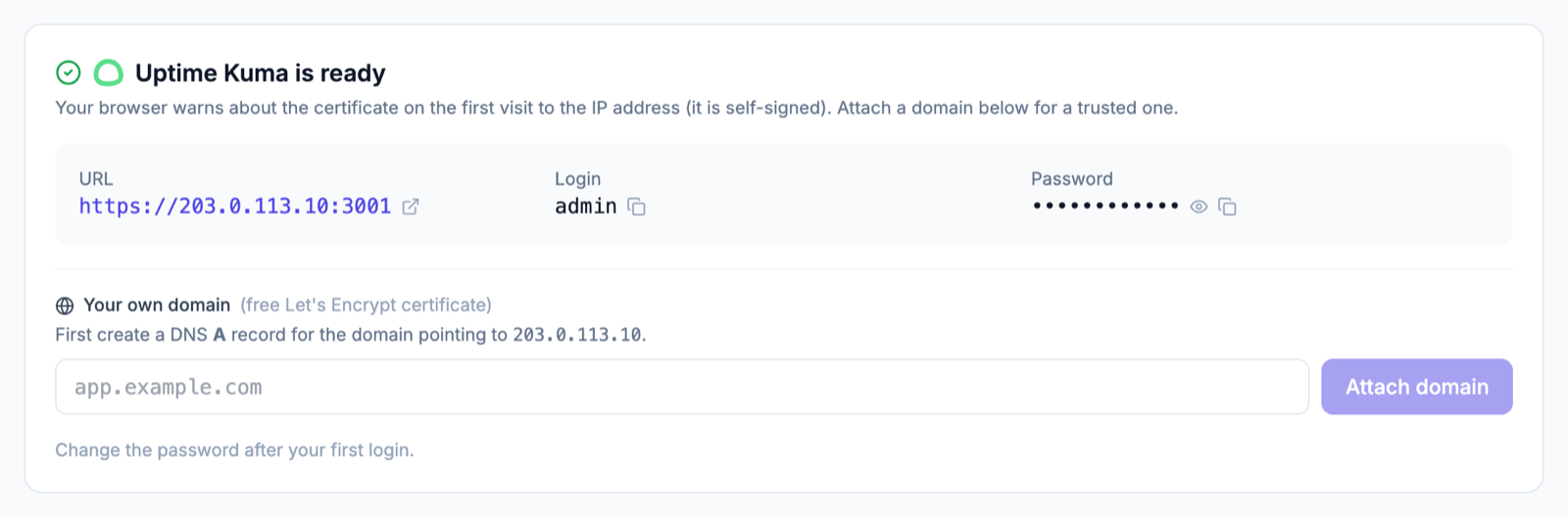
Coolify is the one app that sets its domain inside its own settings, because it issues its certificates itself.
Which VPS plan should you pick for these apps?
All Linux VPS plans below can run one-click apps. RAM is the limit that matters most, and Coolify also needs at least 2 vCPU.
| Plan | CPU / RAM / disk | Price | Good fit |
|---|---|---|---|
| Essential | 2 vCores, 4 GB RAM, 400 GB | $25/mo | n8n, Open WebUI, or several small apps together |
| Comfort | 4 vCores, 6 GB RAM, 600 GB | $35/mo | Coolify with a few deployed projects, or n8n with heavy workflows |
| Elite | 6 vCores, 8 GB RAM, 1000 GB | $50/mo | Coolify hosting many apps and databases |
Prices are billed monthly; the Linux VPS page has the current plans and a quarterly discount code. If you only need Uptime Kuma or a WireGuard VPN, the smallest plan you can order is enough. Pay for more only when you run heavier apps such as n8n with many workflows or Coolify.
Planning to build your own deployment platform? Order a Comfort VPS with Coolify preselected.
When should you set up an app yourself instead?
One-click installs suit most people, but a manual setup is the better choice in a few cases:
- You need an app that is not in the list yet.
- You want a specific version, custom Docker Compose settings or your own reverse proxy rules.
- You want a full hosting panel for websites and email. In that case pick a control panel instead; see our comparison of free VPS control panels. A server runs either apps or a control panel, not both.
For n8n, our step-by-step guide to self-hosting n8n with Docker Compose and Nginx shows the manual route.
Frequently asked questions
Do one-click apps cost extra?
No. The app option is free on every Linux VPS plan. You pay only for the VPS.
Which operating systems do the apps support?
Ubuntu 22.04, Ubuntu 24.04, Debian 12 and Debian 13. If your server runs another OS, the Apps tab shows which systems the app needs, and you can reinstall with one of them.
Can I install a control panel and an app on the same server?
No. Apps and control panels both want ports 80 and 443 and the web server configuration, so Zenith allows one or the other on a server. The order form will not accept both on the same VPS.
Where do I find my app’s password?
In the Apps tab of the Zenith panel, with a copy button. Change it after you log in for the first time.
Does Open WebUI include an AI model?
No. It runs in API mode, so it uses the model provider you connect. Add your OpenAI, Anthropic, OpenRouter or other OpenAI-compatible API key in the Open WebUI admin settings.
What happens to my apps if I reinstall the OS?
A reinstall erases the disk, including the apps and their data. Back up anything you need first. You can pick the same apps again on the reinstall screen and they install on the fresh system.
Get your first app running
Pick the app, pick a plan with enough RAM for it, and the server arrives with the app installed, on HTTPS, with your login waiting in the Apps tab. For most automation projects an Essential VPS with n8n is the place to start. For your own app platform, go with Comfort with Coolify. You can compare all plans on the Linux VPS page.